The Model Context Protocol (MCP) is an open standard for connecting LLMs to external tools and data sources via a JSON-RPC interface. The key insight is that MCP gives you a proper, discoverable API: a model can list available tools, inspect their input/output schemas, and invoke them the same way a developer would call a REST endpoint. It has become the standard for granting AI agents access to external resources, defining both the methods and the message format for accessing and triggering the execution of functions (tools) and instructions (prompts).
I was in charge of creating a remote MCP server to allow our customers to use LLMs to access the data they already have on our platform. What seemed straightforward turned into a deep dive into protocol design, session management, and authorization at scale.
The Problem with the Official SDK
There was one problem: in April 2025, the Python MCP ecosystem was still very young. I needed a library that I could embed directly in a Starlette/FastAPI application — one that was lightweight, type-safe, and simple to reason about. The official SDK had significant issues with our infrastructure, particularly around session management in horizontally scaled environments:
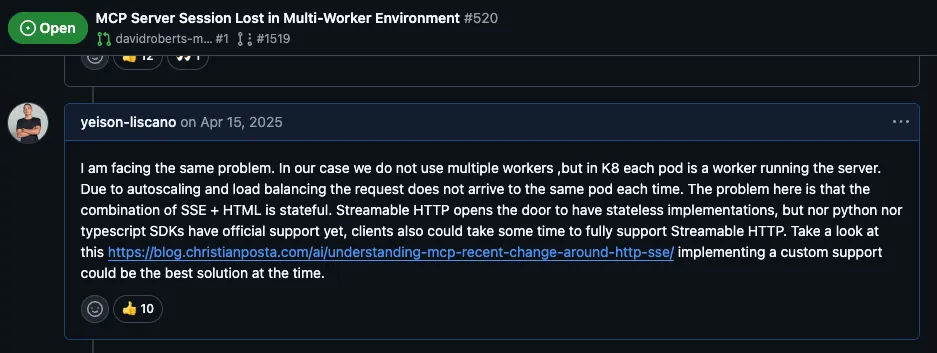
Rather than working around these limitations, I decided to build a library from scratch with the characteristics mentioned above — and without the problems discovered in the official SDK.
Building http-mcp
http-mcp 🔗 (published on PyPI as
http-mcp) implements the MCP spec for tools and prompts over HTTP and STDIO. I
designed it around a few principles:
1. Pydantic-first, schema automatically generated. Tools are declared by
wrapping a Python function in a Tool dataclass and pointing at its Pydantic
input/output models. The JSON schema that MCP clients use for discovery is
derived automatically from those models:
from http_mcp.types import Arguments, Tool
from pydantic import BaseModel, Field, UUID4


class FixMetadataInput(BaseModel):
    vulnerability_id: UUID4 = Field(description="Vulnerability uuid4 id")


class FixMetadataOutput(BaseModel):
    version: str = Field(
        description="Safe version of the dependency",
    )
    is_breaking_change: bool = Field(
        description="Whether upgrading to safe version is a breaking change",
    )


def get_fix_metadata(
    arguments: Arguments[FixMetadataInput],
) -> FixMetadataOutput:
    return FixMetadataOutput(
        version="2.3.4",
        is_breaking_change=False,
    )


tool = Tool(
    inputs=FixMetadataInput,
    output=FixMetadataOutput,
    func=get_fix_metadata,
)
With inputs as Pydantic models validation happens automatically before the data
reaches the tool function. Inputs are rejected with structured errors if they do
not match the schema. Another advantage is that every field is self-documenting
— by using Field(description="..."), both the input and output schemas carry
human-readable documentation that MCP clients can surface to users and models
alike.
2. Starlette-native auth. Rather than inventing a new auth model, the
library plugs into Starlette’s AuthenticationMiddleware. Scope-based access
control just works: tools declare which scopes they require, and the framework
filters them before listing or invocation.
3. Validation errors as LLM feedback. When an AI agent sends malformed
input, the default behavior in most frameworks is to return a raw HTTP error
that the client may silently discard. In http-mcp, setting
return_error_message=True on a tool causes Pydantic validation errors to be
returned as structured tool responses that the LLM actually sees. Instead of a
cryptic 422, the model receives something like “vulnerability_id must be a valid
UUID4, got ‘abc123’” — which is enough context for it to self-correct on the
next attempt without human intervention.
Tool(
    inputs=FixMetadataInput,
    output=FixMetadataOutput,
    func=get_fix_metadata,
    return_error_message=True,  # Validation errors are returned to the LLM
    scopes=("mcp:read",),
)
This turns validation from a dead-end into a feedback loop, saving round-trips and tokens.
Stateful Sessions: A Scaling Problem
The early versions of the MCP Python SDK maintained session state across requests. This creates a critical problem in horizontally scaled environments: if your MCP server runs on multiple workers behind a load balancer, each request might hit a different worker instance. Session data stored on Worker A is invisible to Worker B, causing the session to be lost and the AI agent’s context to break.
This is a fundamental architectural issue for three reasons:
- Load balancers distribute traffic unpredictably. In production, HTTP requests from multiple clients get distributed across different server instances. Sticky sessions are a workaround, not a solution.
- Stateless design is a prerequisite for reliability. Web services should be stateless so any instance can handle any request. This is especially important for MCP servers, where a dropped session means the agent loses its entire tool context.
- Horizontal scaling requires shared-nothing architecture. You cannot scale horizontally if every instance needs to remember its own state. Adding more workers should be as simple as increasing a replica count.
The solution was to implement a stateless HTTP transport that treats each
request as independent. Instead of maintaining session objects in memory, the
transport sends all necessary context in each request. This stateless design
became the foundation for http-mcp:
https://pypi.org/project/http-mcp/ 🔗
Remote MCP Architecture: HTTP vs Stdio
MCP supports two transport mechanisms:
- Stdio Transport: The MCP server runs as a subprocess on the same machine, communicating via standard input/output. This is simple for local integrations but limits you to a single host.
- HTTP Transport: The MCP server runs as a separate service (often remote), communicating over HTTP. This enables true separation of concerns and horizontal scaling.
For production systems, HTTP transport is the practical choice. It allows separate deployment and scaling of the MCP server, easier monitoring and logging, integration with load balancers and service meshes, and language-agnostic communication between components.
The trade-off is complexity: you must handle network errors, timeouts, and ensure your protocol is truly stateless.
Challenge 1: Input Validation — Fail vs Teach
When implementing tools, you receive inputs from the AI agent. These inputs are specified by your schema but often have validation constraints — types, ranges, required fields, and so on.
A naive approach is to return a raw error when validation fails. A better approach is to return a helpful error message that teaches the AI agent what went wrong, so it can correct its own request on the next attempt:
from http_mcp.types import Tool
from pydantic import BaseModel, Field, UUID4


class FixMetadataInput(BaseModel):
    vulnerability_id: UUID4 = Field(description="Vulnerability uuid4 id")


class FixMetadataOutput(BaseModel):
    version: str = Field(
        description="Safe version of the dependency",
    )
    is_breaking_change: bool = Field(
        description="Whether upgrading to safe version is a breaking change",
    )


Tool(
    inputs=FixMetadataInput,
    output=FixMetadataOutput,
    func=get_fix_metadata,
    return_error_message=True,  # Validation errors are shown to the LLM
    scopes=("mcp:read",),
)
With return_error_message=True, when the AI agent receives a validation error
with context (e.g., “vulnerability_id must be a valid UUID4, got ‘abc123’”), it
can adjust its next attempt. This saves round-trips and makes the interaction
significantly more efficient.
Challenge 2: Context-Based Tool Exposure
Not all tools should be available to all callers. You might want:
- Public tools (no auth required): A “get_server_status” tool anyone can use
- Private tools (auth required): A “delete_user” tool only admins can access
- Scoped tools: Different tools for different contexts or user roles
I solved this by leveraging Starlette’s scope system. Each HTTP request carries scope metadata (user, role, permissions), and tools declare which scopes they require:
from http_mcp.types import Tool
from pydantic import BaseModel, Field, UUID4


class FixMetadataInput(BaseModel):
    vulnerability_id: UUID4 = Field(description="Vulnerability uuid4 id")


class FixMetadataOutput(BaseModel):
    version: str = Field(
        description="Safe version of the dependency",
    )
    is_breaking_change: bool = Field(
        description="Whether upgrading to safe version is a breaking change",
    )


Tool(
    inputs=FixMetadataInput,
    output=FixMetadataOutput,
    func=get_fix_metadata,
    return_error_message=True,
    scopes=("mcp:read",),  # Only callers with "mcp:read" scope can use this tool
)
This approach has several benefits: tools are self-documenting about their requirements, authorization is centralized and consistent, you can change permissions without modifying tool code, and the AI agent can query which tools are available in its current context — so it never tries to call something it does not have access to.
Lessons Learned
Building a production MCP server taught me several things:
-
Stateless by default. Design your server assuming instances are ephemeral. This makes scaling trivial and eliminates an entire class of session-related bugs.
-
Error messages are feedback loops. The AI agent learns from error messages. Make them helpful and specific — generic errors cause retries and wasted tokens. Some MCP clients do not even pass error responses to the LLM; this is solved by declaring errors as a kind of response the tool can provide via
return_error_message=True. -
Explicit permissions matter. Making scope requirements visible in tool definitions makes it easier to reason about security and to conditionally expose tools and prompts based on the caller’s identity.
References
- Official MCP Specification: modelcontextprotocol.io 🔗
- My HTTP Transport Implementation: http-mcp on PyPI 🔗
- Stateless Sessions Discussion: Python SDK GitHub Issue #520 🔗